Biggest Z85A Oled Buying Mistakes (And How to Avoid Them)
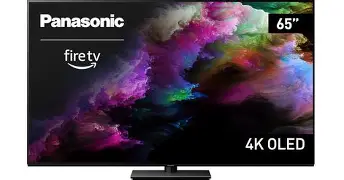
The Panasonic Z85A OLED represents a significant shift in the premium television landscape, blending the legendary color accuracy of Japanese engineering with the modern versatility of the Fire TV operating system. As early adopters and home theater enthusiasts flock toward this high-performance display, a series of recurring pitfalls have emerged. Investing in a flagship OLED is as much about understanding the environment it will live in as it is about the panel technology itself. This comprehensive guide explores the most frequent errors consumers make when purchasing the Z85A and provides technical insights to ensure your investment delivers the cinematic experience you expect.
Understanding the Z85A OLED Architecture
Before diving into the mistakes, one must understand what makes the Z85A unique within the Panasonic lineup. While it sits just below the flagship Z95A with its Master OLED Pro panel, the Z85A is designed to be the "sweet spot" for many users. It utilizes a high-brightness OLED panel that focuses on peak luminance and color volume, driven by the HCX Pro AI Processor MK II. This processor is the brain of the operation, handling everything from 4K upscaling of legacy content to the intricate tone mapping required for HDR10+ and Dolby Vision IQ.
The inclusion of the Fire TV OS is perhaps the most notable departure from previous years. For years, Panasonic fans had to navigate the somewhat utilitarian "My Home Screen" interface. The Z85A changes this by integrating a deep, content-first smart platform. However, this shift in software architecture brings its own set of considerations, especially regarding data privacy, user interface navigation, and smart home integration. Many buyers assume it functions exactly like a standalone Fire Stick, but the integration is much deeper, affecting how the TV handles HDMI-CEC and external sound systems.
Mistake 1: Ignoring the Room’s Ambient Light Profile
One of the most common mistakes when buying the Z85A is failing to account for the physical environment. While the Z85A features an improved panel with better brightness than older OLED generations, it is still an organic light-emitting diode display. OLEDs excel in controlled lighting environments where their perfect blacks can truly shine. A frequent error is placing the Z85A directly opposite a large, south-facing window with no light control.
Buyers often confuse "peak brightness" with "glanceability" in bright rooms. Even though the Z85A can hit impressive specular highlights in HDR content, the overall average picture level (APL) is lower than that of a high-end Mini-LED. If your primary viewing time is Sunday afternoon football in a sun-drenched living room, the Z85A might struggle against reflections. To avoid this mistake, assess your room’s light. If you cannot install blackout curtains or moderate the light, you may find yourself disappointed by the mirror-like finish of the screen during dark movie scenes. Use the Z85A in rooms where you can at least dim the lights for critical viewing.
Mistake 2: Underestimating the 120Hz Gaming Capabilities
The Z85A is a gaming powerhouse, but many users fail to optimize their setup to take advantage of it. A major mistake is connecting a PlayStation 5, Xbox Series X, or a high-end PC to the wrong HDMI port. This model typically features two HDMI 2.1 ports and two HDMI 2.0 ports. Users often plug their console into HDMI 3 or 4, which are limited to 60Hz, and then wonder why their gameplay feels sluggish or why they cannot enable Variable Refresh Rate (VRR).
Furthermore, the Z85A supports the "True Game Mode," which is factory-calibrated to preserve color accuracy even when latency is minimized. Many buyers ignore this, opting for "Vivid" or "Standard" modes while gaming because they look "punchier." This is a mistake because it introduces significant input lag and destroys the artistic intent of the game developers. To avoid this, ensure your primary consoles are in the 4K/120Hz capable ports and that you have engaged the Game Control Board to monitor your frame rates and HDR status in real-time.
Mistake 3: Misjudging the Integrated Sound System
Panasonic is known for its "Soundscape" technology, and the Z85A produces remarkably clear audio for a flat-panel display. A frequent mistake is either overestimating its capability to replace a dedicated Atmos system or, conversely, immediately disabling it without testing its unique spatial tuning. The Z85A uses a front-firing array that is significantly better than the downward-firing speakers found on budget OLEDs.
Find top-rated TVs & Home Theater products at great prices.
Shop Amazon →However, the mistake lies in the "middle ground." Buyers often spend $3,000 on the TV and then pair it with a cheap $150 soundbar. In many cases, the internal speakers of the Z85A are actually more balanced than a low-end soundbar. If you are not going to invest in a high-quality 5.1.2 surround system or a premium soundbar with upward-firing drivers, you might be better off sticking with the internal audio. The TV includes a dedicated subwoofer output, which is a rare and excellent feature. A "pro tip" to avoid audio mistakes: instead of buying a cheap soundbar, buy a high-quality active subwoofer and plug it directly into the TV. This creates a powerful 2.1 system that utilizes the TV's excellent mids and highs while providing the cinematic "thump" that integrated speakers lack.
Analysis: Z85A OLED Performance Breakdown
To truly understand the value proposition of this unit, we must look at the performance metrics that matter to long-term owners. The Z85A is built for the "purist" who also wants modern convenience. The HCX Pro AI Processor MK II does an exceptional job of cleaning up low-bitrate content from streaming services, which is a vital task since most of what we watch isn't native 4K Blu-ray quality.
Pros and Cons of the Z85A
- Pro: Exceptional Color Accuracy: Out of the box, the "Filmmaker Mode" provides one of the most accurate representations of the D65 white point available in the consumer market.
- Pro: Fire TV Integration: The interface is fast, responsive, and provides access to every major streaming app with deep Alexa voice integration for smart home enthusiasts.
- Pro: Versatile HDR Support: Unlike some competitors, Panasonic supports both Dolby Vision IQ and HDR10+ Adaptive, ensuring you get the best metadata-driven picture regardless of the format.
- Pro: Build Quality: The pedestal stand is robust and minimizes screen wobble, showing a level of industrial design often missing in thinner, more fragile competitors.
- Con: Limited HDMI 2.1 Ports: With only two High-Speed ports (one of which is the eARC port), users with multiple consoles and a soundbar will find themselves needing an external HDMI switcher.
- Con: Interface Ads: Since it runs Fire TV, the home screen can feel cluttered with "sponsored" content compared to the cleaner, simpler interfaces of the past.
- Con: Peak Brightness vs. Z95A: It does not feature the Micro Lens Array (MLA) tech found in the Z95A, meaning it cannot reach the extreme 2000+ nit peaks of its more expensive sibling.
Technical Comparison: Z85A vs. Competitive Tiers
Choosing the right TV often requires looking at how a specific model sits in the broader market. Below is a comparison centered around the Z85A's place against entry-level OLEDs and ultra-premium flagships.
| Feature | Entry-Level OLED | Panasonic Z85A | Flagship MLA OLED |
|---|---|---|---|
| Panel Type | Standard WOLED | Master OLED Pro | Master OLED Ultimate (MLA) |
| Processor | Basic 4K Scaling | HCX Pro AI MK II | HCX Pro AI MK II |
| Refreshrate | 60Hz / 120Hz | 120Hz (Up to 144Hz) | 144Hz |
| HDR Formats | HDR10/Dolby Vision | Full Support (DV/HDR10+) | Full Support (DV/HDR10+) |
| Audio Config | 2.0 Down-firing | Front-firing Array | 360 Soundscape Pro |
Mistake 4: Neglecting the Calibration and "Eco" Settings
One of the most frustrating mistakes people make with a high-end Panasonic is leaving the "out of the box" settings active. Modern environmental regulations require TVs to ship in an "Eco" or "Standard" mode that aggressively dims the panel to save power. Thousands of buyers have returned OLEDs claiming they are "too dark," simply because they never disabled the ambient light sensor or the energy-saving power restrictions.
The Z85A features an incredibly sophisticated Intelligent Sensing system. While this is great for automatically adjusting the picture as the sun goes down, it can be too aggressive for some. If you want the full potential of the Master OLED Pro panel, you must venture into the settings. To avoid this mistake, immediately switch the TV to "Professional 1" (for day) or "Professional 2" (for night) or "Filmmaker Mode." Ensure that any "Auto Power Save" features are tuned to your preference rather than the factory maximum. This single step can increase your perceived brightness by as much as 30%.
Mistake 5: Poor Cable Management and Bandwidth Choke
A high-performance TV is only as good as the data being fed into it. A common buying mistake is reusing old HDMI cables from a 10-year-old 1080p setup. The Z85A requires "Ultra High Speed" HDMI cables (48Gbps) to handle 4K at 120Hz with 10-bit color and HDR. Using an inferior cable will lead to intermittent black screens, "sparkles" in the image, or the inability to enable the highest color depth.
Furthermore, because the Z85A is a smart TV, your network connection matters. Many people rely on the built-in Wi-Fi, but if your router is two rooms away, you will experience buffering and dropped resolution on 4K Dolby Vision streams. If possible, use the Ethernet port. However, a technical "trap" to be aware of: most TV Ethernet ports are capped at 100Mbps. If you have a gigabit connection and want to stream high-bitrate local files (like from a Plex server), the Z85A’s 5GHz Wi-Fi might actually be faster than its wired connection, provided the signal is strong. Always test both to see which provides the most stable bandwidth for 4K content.
Buying Guide: Is the Z85A Right for You?
Buying a TV in this price bracket is a balance between performance and value. The Z85A is positioned for a specific type of buyer. To determine if you are making the right choice, consider the following personas:
Discover deals on TVs & Home Theater — updated daily.
Browse Now →The Cinematic Purist
If you care about seeing exactly what the director intended, the Z85A is arguably the best choice in its price class. Panasonic’s history of working with Hollywood colorists means their tone mapping is more conservative and accurate than brands that favor "pop" over "realism." If you watch 4K Blu-rays or high-bitrate Netflix streams, this is your TV.
The Mixed-Use Gamer
If you spend 50% of your time on a console and 50% watching movies, the Z85A is a strong contender. The inclusion of the Game Control Board and 144Hz support for PC gamers makes it versatile. However, if you have three or four HDMI 2.1 devices, the port limitation might be a dealbreaker unless you use a modern AV receiver.
The "Easy Tech" User
If you are already in the Amazon ecosystem (Alexa, Ring cameras, Fire Tablets), the Z85A is a dream. You can view your front door camera as a picture-in-picture while watching a movie. If you find smart TV interfaces confusing, the Fire TV OS is generally more intuitive and content-focused than the proprietary systems used by other manufacturers.
Burn-In Concerns: Fact vs. Fiction
A recurring mistake is the "avoidance error"—where a buyer chooses an inferior LED TV because they are terrified of OLED burn-in. With the Z85A, this fear is largely outdated for average users. The HCX Pro AI MK II processor includes sophisticated pixel-shifting technology and luminance management for static logos. Unless you are running a 24-hour news channel with a bright red ticker at maximum brightness for 10 hours a day, the risk of permanent image retention is minimal.
To avoid the "maintenance mistake," simply let the TV do its job. When you turn off the TV via the remote, do not unplug it from the wall. The Z85A performs a short "pixel refresh" cycle in standby mode after a few hours of use. If you cut the power completely, the TV cannot maintain the health of the panel, which is the leading cause of premature panel degradation.
Conclusion: Mastering the Purchase
The Panasonic Z85A OLED is a masterclass in balance. It offers the color accuracy once reserved for professional studios alongside the mainstream appeal of the Fire TV interface. Avoiding the mistakes listed above—such as poor room placement, incorrect port usage, and neglecting the calibration menus—will ensure that you aren't just buying a screen, but investing in a centerpiece for your home entertainment. By understanding the technical nuances of the HDMI bandwidth, the specific audio strengths of the front-firing array, and the importance of disabling power-saving modes for critical viewing, you can unlock the full potential of this exceptional display. The Z85A proves that when hardware and software are harmonized, the result is a viewing experience that remains immersive, accurate, and deeply satisfying for years to come.